

- 探索
- 产品
-
企业
Wacom 在企业中的应用

签名
解决方案使用 Wacom 硬件和软件解决方案审阅、注释和签署数字文档。

技术解决方案
为世界领先企业的优化和高效提供技术解决方案。

Wacom Ink Technologies
通用墨迹引擎和油墨层框架,可连接硬件、软件和应用程序。

教育
提供多种解决方案,帮助教师和学生进行创作、沟通以及获得最好的学习体验。
-
教育

Creative Education
激励您的学生拓展他们的创作视野,使其为艺术与设计职业生涯做好准备。

Wacom 与教育
支持教师和学生适应新的学习环境。
- 支持
- 商店
















A display refined to feel like drawing on paper, combined with our highest-precision pen. The sensation of drawing exactly as you intend — a complete synchronization of the senses. An Evangelion collaboration design that elevates every moment of creation. For professionals devoted to their tools, it is an immersive creative experience beyond all expectations. Wacom MovinkPad Pro EVA Edition

Specially designed user interfaces for Wacom-exclusive applications such as Wacom Canvas and Wacom Shelf. Every time you begin drawing, the Evangelion series world synchronizes with your pen tablet, igniting your creative drive.
Wacom Shelf EVA
Honeycomb structure inspired by the world of EVANGELION series. Tagging color schemes modeled after iconic Evangelion units.
Wacom Canvas EVA
Choose from plain, storyboard-style, or layout-style backgrounds. Select pen colors inspired by the characters.
Wacom CClock EVA
Featuring built-in Clock and Compass functions.
The exclusive box features a holographic print of Evangelion Unit 01, while logo-accented accessories complete a cohesive, unified design. With every touch and every glance, the EVANGELION series world heightens your focus and deepens your engagement in the creative process.

The exclusive box features a holographic print of Evangelion Unit 01, while logo-accented accessories complete a unified design inspired by the Evangelion world.
With every touch and every glance, the Evangelion world heightens your focus and deepens your engagement in the creative process.

- Wacom MovinkPad Pro EVA Edition
- Wacom MovinkPad Pro 14 Cover EVA Edition
- Wacom Foldable Stand EVA Edition
- Wacom Rollup Case EVA Edition
- Wacom Pro Pen 3 EVA Edition

A 14" OLED display equipped with Wacom Premium Textured Glass. Engineered for creation with a high resolution of 2880 × 1800 pixels and 100% DCI-P3 wide gamut color coverage, it delivers a new standard of performance for OLED. AR (anti-reflection), AG (anti-glare), and AF (anti-fingerprint) treatments reduce reflections and glare while resisting fingerprints, for a truly stress-free experience.

Inspired by the familiar form of a mechanical pencil, Wacom Pro Pen 3 combines state-of-the-art EMR technology with highly precise pressure sensitivity. The result is the smoothest, most accurate digital linework ever achieved in Wacom’s history. Its modular design allows you to tailor the drawing feel to your needs. Like a dedicated instrument that extends the user’s senses, it becomes a pen optimized precisely for your hand.


你的创作经验推动创新前行
透过 Wacom MovinkPad Pro 14,加入 Wacom Lab —— 一个实验性的创作者社区,我们正在这里对最新功能和服务进行测试。
在 Wacom Lab 中,用户可以抢先体验尚未正式发布的功能,并提供反馈,帮助产品改进与优化。
你的创作经验将有助于共同分享并共创 Wacom 的新功能与服务,开启更多可能性。
【首个释出的测试版功能:即时数位屏模式】
Wacom Lab 的首个功能是即时数位屏模式,它可让您将 Wacom MovinkPad Pro 14 与电脑连接。
通过该功能,您可以直接在 Wacom MovinkPad Pro 14 的屏幕上使用 Windows 或 Mac 上的应用程序绘图。
该功能仍处于测试阶段,性能无法保证。
有关如何使用即时数位屏模式的详细说明,请参阅入门页面。
每台全新 Wacom MovinkPad Pro 14* 均可获得免费软件附赠福利
*如需获得软件免费使用授权,需登录或创建包含您个人数据的 Wacom ID,并注册您的 Wacom MovinkPad Pro 14。


Clip Studio Paint Debut
The entry grade of Clip Studio Paint, the app used by professionals around the world. Features essential functions for creating illustrations, over 40,000 free brushes, 3D models for reference, and the ability to create comics and short animations. Use this app for one year to create anything from sketches to finished masterpieces.
Note: A Clip Studio account is required to use Clip Studio Paint Debut. Terms of use apply.
Clip Studio Paint DEBUT users can upgrade to Clip Studio Paint PRO/EX monthly or yearly subscription plans at a special price.


配件

Wacom Pro Pen 3 标准笔尖 5 支装
备用 Wacom Pro Pen 3 标准笔尖 (ACP50000DZ) 5 支装

Wacom Pro Pen 3 felt 毛毡笔尖 10 支装
备用 Wacom Pro Pen 3 felt 毛毡笔尖 (ACP50000DZ) 10 支装

Wacom Pro Pen 3 橡胶笔尖 5 支装
针对 Wacom Pro Pen 3 (ACP50000DZ) 的替换用橡胶笔尖 5 支装。
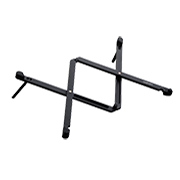
Wacom 折叠支架
这款支架可以快捷、方便地展开使用,折叠起来就可装在包里外出携带。
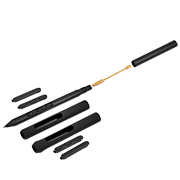
Wacom Pro Pen 3
实现您所期待的 Wacom 压感笔精确度。可自定义重量/重心、笔握厚度或笔型,以及笔侧按键,找到属于自己的握笔风格。

Wacom Pro Pen 3E
Wacom Pro Pen 3E 的末端具备一个实体橡皮擦,笔身具备一个用于连接笔绳的笔绳孔。*Wacom Pro Pen 3E 只可自定义笔侧按键。 不能安装笔握和配重条。
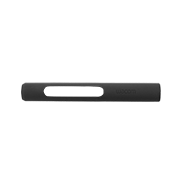
包含 Wacom Pro Pen 3 直筒笔握
备用 Wacom Pro Pen 3 直筒笔握 (ACP50000DZ)

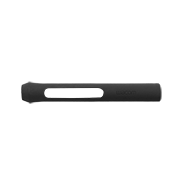
包含 Wacom Pro Pen 3 喇叭口笔握
备用 Wacom Pro Pen 3 喇叭口笔握 (ACP50000DZ)
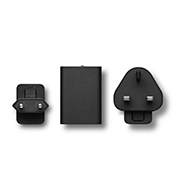
电源适配器
备用交流电源适配器是专为 Wacom Cintiq 16 (DTK168)、Wacom Movink (DTH135)、Wacom One (DTH134 / DTC121)、Wacom MovinkPad 11 (DTHA116C)、Wacom MovinkPad Pro 14 (DTHA140) 设计的外接电源供电。USB-C 电源适配器及附各地区当地适用的插头。

Wacom Pro Pen 3 自定义套件
Wacom Pro Pen 3 压感笔的自定义套件。可自定义重量或中心、笔握厚度、压感笔按键数量,找到适合自己风格的平衡点。
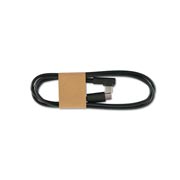
USB-C 转 C 数据线 1.0 米
备用 USB-C 线缆 (1.0 米) 可用于 Wacom One 笔感式数位板 (CTC6110WL / CTC4110WL)、Wacom Intuos Pro (PTK870 / PTK670 / PTK470)、Wacom MovinkPad 11 (DTHA116C)、Wacom MovinkPad Pro 14 (DTHA140)。 (该线缆不支持视频传输)。
Wacom MovinkPad Pro 14 规格

多功能一体机
内置操作系统

免电池压感笔
无需充电

压感笔
Wacom Pro Pen 3, 受专业人士喜爱的同款工具 & 第三方兼容压感笔

显示尺寸(对角线)
14.0 英寸

Wacom 精制纸纹玻璃(高级纹理玻璃)
防反射
防眩光
防指纹
全贴合

Wacom UX
优化创作者的创作体验
产品信息
产品类型
平板电脑
型号
DTHA140
产品尺寸(长 x 宽 x 高)
323.3 x 210 x 5.9 毫米/12.7 x 8.3 x 0.23 英寸
产品重量
699 克 / 1.6 磅
产品颜色
浅灰色
贮存温度与湿度
- 温度:-10 至 60 摄氏度
- 湿度:30 至 90%RH(无凝结)
运行温度和湿度
- 温度:5 至 40 摄氏度
- 湿度:30 至 80% RH(无凝结)
保修信息
-
屏幕、压感笔、触控技术
屏幕尺寸(对角线)
14.0 英寸 / 35.6 厘米
操作区域
302 x 189 毫米/11.9 x 7.4 英寸
显示技术
OLED
屏幕表面
Wacom 精制纸纹玻璃(AR +AF+AG)
全贴合技术
具备
触控技术
投射电容技术
多点触控
支持 - 10 指
显示分辨率
2880 x 1800
可显示颜色数
10.74 亿
色彩深度
10bit xRGB= 30bit
色域覆盖率
sRGB 100%(CIE1931) (typ),DCIP3100% (CIE1931) (typ)
屏幕长宽比
16:10
可视角度
170 度(85/85)水平 / 170 度(85/85)垂直(典型值)
对比度
100,000:1(典型值)
亮度
400cd/m2(典型值),峰值:900cd/m2(典型值)
屏幕刷新率
60/120Hz
屏幕品质
每块OLED面板都是按照非常严格的质量标准生产的。生产技术无法保证TFT显示屏绝对完美。Wacom 不允许像素始终为白色或黑色。允许少数像素在色谱的某些部分显示错误的颜色。
压感笔
Wacom Pro Pen 3 及笔囊工具
压感笔技术
电磁共振技术
压感笔压感级别
8192 级
支持压感笔倾斜角度
60 度
压感笔坐标分辨率
5080 LPI
压感笔类型
压力感应、无需连线或电池
按键
3 颗笔侧按键
计算规格和连接性
处理器
骁龙®第三代 8s
运行内存
12GB
存储容量
256GB
扩展存储
microSD™ 卡插槽 x1
操作系统
Android™ 15
无线连接
无线局域网IEEE802.11a/b/g/n/ac/ax
蓝牙 5.4
输入输出端口
1 个 USB Type-C 端口(USB2.0)
电池类型
锂离子电池
电池容量
10,000mAh (典型值)
连续运行时间
长达 10.5 小时*
*JEITA 电池工作时间测量方法 Ver.3.0
摄像头
不支持
麦克风/扬声器
双麦克风
立体声扬声器
传感器
重力加速度传感器
电子罗盘
环境光传感器
全球导航卫星系统
全球定位系统
Wacom MovinkPad Instant Pen Display(即时数位屏模式)的系统要求
- Windows: Windows 11 * 不支持基于 ARM 架构的 Windows 电脑。
- Mac:macOS 14 (Sonoma)、15 (Sequoia)、26 (Tahoe) *不支持英特尔芯片的 Mac 电脑。
包装内容与可选购配件
包装清单
-
Wacom MovinkPad Pro 14
-
Wacom Pro Pen 3 内置笔囊(含碳轴 POM 笔尖 x1,毛毡笔尖 x1,POM 笔尖 x1)、
-
USB-C 转 USB-C 数据线(1 米/电源)
-
SD 卡工具
-
重要产品信息小册子
-
合规信息
可选购配件
-
Wacom MovinkPad Pro 14 保护盖 (ACK45633Z)
-
Wacom Movink USB-C 转 C 连接线 1.0 米 (ACK45206Z)
-
Wacom One S & M USB-C转 C 数据线 1.0 米 (ACK45006Z)
-
Wacom 折叠支架 (ACK652Z)
-
Wacom Pro Pen 3 三代专业笔 (ACP50000DZ)
-
Wacom Pro Pen 3E 三代专业笔含橡皮擦功能 (ACP501E00DZ)
-
电源适配器 15W US,TW JP(ACK44914A)
-
电源适配器 15W(含欧标、瑞典标、英标插头)(ACK44914B)
-
电源适配器 15W(含澳标、韩标、印标插头)(ACK44914C)
-
Wacom Pro Pen 3 直筒型笔握 (ACK34801Z)
-
Wacom Pro Pen 3 喇叭口笔握 (ACK34802Z)
-
Wacom Pro Pen 3 碳轴 POM 笔尖 (ACK24801Z)
-
Wacom Pro Pen 3 毛毡笔尖 (ACK24819Z)
-
Wacom Pro Pen 3 碳轴橡胶笔尖 (ACK253010Z)