Marquee

Bamboo Spark Logo

Get Started with your new Bamboo Spark

It’s easy to get started with Bamboo Spark, and turn your ideas on paper into practical digital notes.

Follow the steps below to make the most of your new smart folio.

Set up your Bamboo Spark

Step 1

1. Turn on Spark

Step 2

2. Hold for 5 seconds

Step 3

3. Select your Spark

Step 4

4. Press to confirm

Step 5

5. Enter unique name

Step 6

6. Adjust Spark Position

Wacom bamboo spark getting started setup
Step 7

7. Success

Sign up for Inkspace (Wacom Cloud)

Registering your Bamboo Spark with Inkspace (Wacom Cloud) helps you simply and seamlessly sync all of your Bamboo Spark content for access from any Bluetooth® Smart enabled device (iOS/Android) with the Wacom Inkspace app (Bamboo Spark app). You’ll get 5GB of storage free.   

This is where your notes will be automatically synced for you access again any time, anywhere. It’s free to set up an account and it comes with 5GB of storage.

With Inkspace you can sync and access your notes across devices. You can also export your notes for use in other apps, such as Evernote and Dropbox. And if you don’t have a smart device on hand, you can still access your notes on the web at inkspace.wacom.com.   

Wacom bamboo spark getting started start writing

Start writing.

Use the Bamboo Spark pen and start writing on paper. When you’re finished with a page of notes, press the button on the smart folio to save them to the Wacom Inkspace app (Bamboo Spark app). Don’t worry if you forget to press the button before starting a new page. Your notes are time-stamped, so you can arrange them later in the Wacom Inkspace app (Bamboo Spark app).

Your pen requires a Bamboo Spark ink cartridge to work, available for purchase on the Wacom website.

Edit and refine with WILL logo

The Wacom Ink Layer Language (WILL™) is the universal inking engine and ink layer framework that connects hardware, software and applications. By using WILL™ technology, the notes you capture on the Bamboo Spark will remain editable for further refinement or enhancement within the Wacom ecosystem.

Wacom bamboo spark getting started WILL 1

Seemlessly exchanging WILL data
through cloud platform and services.

Wacom bamboo spark getting started WILL 2

Bringing hardware and software
together

Wacom bamboo spark getting started WILL 3

Building a world of ink users.

Bamboo spark free ebook How to draw m

Download the free ebook, “How to Draw Your Idea”

Download the free ebook, “How to Draw Your Idea” when you sign up for the Bamboo newsletter. It’s a bi-monthly source of inspiration for taking your ideas even further.

Bamboo Paper

Collaborate with

Bamboo Paper Logo

The Bamboo Paper app lets you manage and organize your notes, as well as share them with your peers. To get started, simply export your notes into Bamboo Paper.

Get Bamboo Paper

Recommendations and guidelines for cleaning your Wacom product

All Wacom products can be safely cleaned with 70 or 75 percent isopropyl alcohol (rubbing alcohol) when applied to a soft lint free cloth. Lightly wipe the moistened cloth on the hard, nonporous surfaces of your Wacom product, such as the display, or other exterior surfaces. Don't use bleach. Avoid getting moisture in any opening, and don't submerge your Wacom product in any cleaning agents. See below for additional tips or please contact your regional Wacom customer service team.

Learn more

Accessories

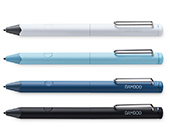
Bamboo Spark Pen

Replacement pen for your Bamboo Spark (CDS600).

Bamboo Spark Notepads

3-pack of A5/half letter size notepads designed to fit perfectly with your Bamboo Spark.

Bamboo Spark Closure Bands

3-pack of replacement closure bands for your Bamboo Spark.

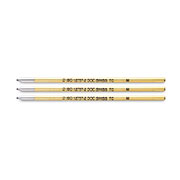
Ink Cartridges

D2 refill, 3-pack of ink cartridges for your Wacom Ballpoint pen.

Back to top
A+ A-
Support